AI and Operations
Will AI Replace Virtual Assistants? What's Actually Changing for Filipino VAs and OBMs

Annikka AborroPublished Oct 13, 2026 · 9 min read

Short answer
AI won't replace every virtual assistant, but it is already replacing VA tasks, and VAs whose whole job is those tasks are at real risk. What AI doesn't do is decide what's worth automating, check the output, or own the result. That judgment is the job now. A job title alone protects nobody.
Free OBM Readiness Scorecard
A few minutes, a personalized result, and a clear next skill to practice.
Take the ScorecardUnpopular opinion: "AI can't replace you" is the worst advice a VA can hear right now.
It sounds kind. It isn't true for a lot of people. So let's answer "will AI replace virtual assistants" honestly: some VA tasks are already gone, some VA jobs are going with them, and the people who keep growing are the ones who own the judgment the tools can't carry.
I started working online at 18, teaching English and then as a VA. In 18 years I've watched tools change this work many times. This round is faster.
Is AI already replacing VAs?
Yes, in some cases it already is. On October 12, a VA wrote on Reddit that their agency had called to say they were being let go for redundancy. Their client, a founder building a startup, had gone all in on AI and decided he could run things with his own AI setup instead of a VA (Reddit, Oct 12, 2026).
The replies are worth reading, because they split three ways.
Some people said he'd come back, because AI still needs an operator. One commenter wrote, "AI needs a lot of babysitting." Another said their boss's new AI setup cut one customer service task from four hours to 30 minutes, freeing them for other projects. And one reply was blunt: "With or without AI, VAs are replaceable" (same Reddit thread).
All three are true at the same time. That's the part most articles on this question skip.
Will AI replace virtual assistants in the Philippines?
AI will replace many of the tasks Filipino VAs are hired for, and that changes which VA roles clients keep paying for. It doesn't remove the need for someone who understands the business and owns the result.
The International Labour Organization's global index of generative AI exposure (May 2025, so not new) found that "Clerical jobs face the highest exposure of all." The same release says "transformation, not replacement, is the most likely outcome" (ILO, May 20, 2025).
"Transformation" sounds gentle until you notice who gets transformed out. If your work is mostly the clerical part (the inbox, the notes, the data entry, the first draft), you're in the most exposed group. If your work is deciding, checking and owning, you're in a different conversation.
What changed in AI tools this month?
This month Google rolled out features that draft meeting follow-ups and automate routine steps in Google Workspace, where a lot of VAs work every day. Here's what the official announcements say (checked October 13, 2026).
Google Meet "next steps" (announced October 12, 2026). After a meeting, Meet can now suggest next steps powered by Gemini and Workspace Studio. At launch there are two: drafting a follow-up email and adding action items to Google Tasks. It only works if "Take notes for me" was on during the meeting. It's on by default, and admins can turn it off. The rollout started October 5 and may take longer than 15 days to show up. It's listed for Business Standard and Plus, Enterprise Standard and Plus, and Google AI Pro for Education. The announcement doesn't mention any country limits (Google Workspace Updates, Oct 12, 2026).
Workspace Studio flow updates (announced October 9, 2026). Workspace Studio lets people build workflows without code. The October release adds branching logic inside flows, an option for Gmail triggers to ignore follow-up replies, more meeting details plus templates for follow-up email drafts, and a step that searches Drive for a matching Doc. Rollout starts October 13 and can take up to 15 days (Google Workspace Updates, Oct 9, 2026).
Think about what that means. "Send the recap and update the task list after the call" is one of the most common VA tasks there is. On some Workspace plans, a draft of it now shows up on screen by itself.
What the announcements don't promise: that the recap is right, that every action item has a real owner, or that everything said should go to the client. That's still a person's job.
Which VA tasks can AI do now, and what still needs a person?
AI can now draft, sort, summarize and route a lot of routine VA work. A person still has to decide what matters, check the output, and take responsibility when it's wrong. Here's my read of common tasks (my view, not a study).
| Task | What AI can now draft or do | What still needs a person |
|---|---|---|
| Meeting notes and recap | Summary, follow-up email draft, task list | Deciding what goes to whom, catching what's wrong or sensitive |
| Inbox management | Sorting, labeling, reply drafts | Spotting the email that puts the client relationship at risk |
| Content and articles | First drafts, outlines, SEO checks | Fact-checking claims, matching the brand, saying "this shouldn't go out" |
| Customer service | FAQ replies, routing | Complaints, refunds, exceptions, tone with an upset customer |
| Reporting | Pulling numbers into a summary | Explaining what the numbers mean and what to do next |
| Automations | Building the flow | Choosing the right process to automate, and noticing when it quietly breaks |
Clients are writing this into job posts. A September post for an Online Business Manager and Team Lead asks for "Confidence using Claude for practical work, with the judgment to review its output" (OnlineJobs.ph job post, Sep 26, 2026).
Notice what they're hiring for. Not the Claude part. The judgment part.
What judgment does VA and OBM work need now?
The work now needs someone who can decide what's worth automating, check what the tool produces, and own the result when something goes wrong. That's much closer to OBM work than to task work.
Here's the line I use when I teach: "An OBM is not paid to be the busiest person in the business. An OBM is paid to turn chaos into clarity." AI makes busy cheaper. It doesn't make clarity cheaper.
How do I decide what to automate?
Use the Automation Opportunity Map, a framework I teach at the Philippine OBM Academy. It's five questions you answer before you touch any tool:
- What triggers the work? A form, an email, a meeting ending, a payment.
- What repeats every time? The steps that are the same no matter who's involved.
- What can be drafted, routed or flagged? This is the part AI can take.
- What still needs a human? Decisions, exceptions, anything that risks money, clients or reputation.
- What result proves it helped? Fewer missed follow-ups, faster replies, less of the founder's time.
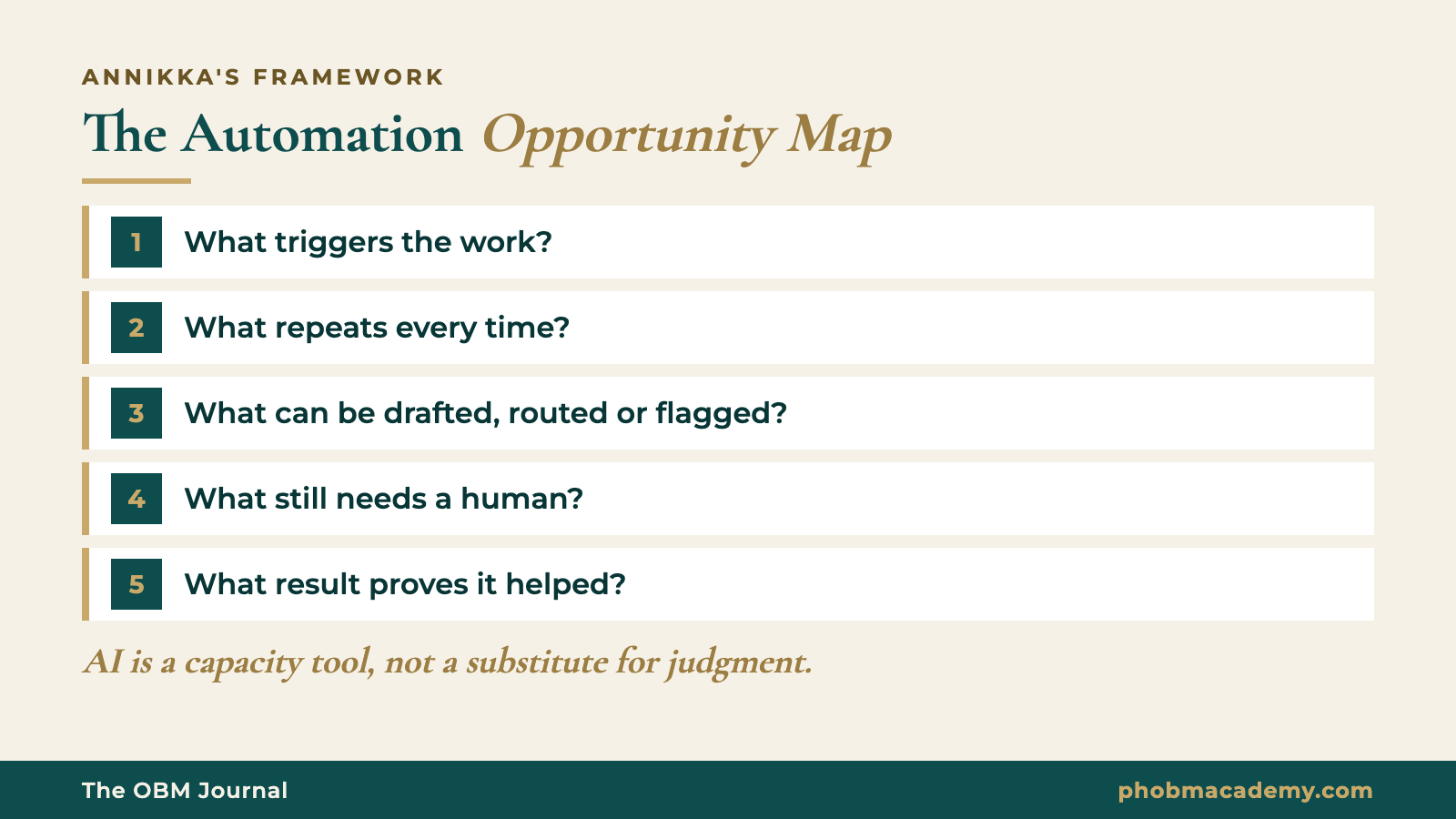
The rule behind it: AI is a capacity tool, not a substitute for judgment.
Here's a made-up example. Say your client runs a coaching business with a weekly team call, and the follow-ups keep getting lost. Run the map:
- Trigger: the weekly call ends.
- Repeats: a recap, a list of action items, a reminder to whoever owns each one.
- Drafted or routed: the recap and the task list, which some Workspace plans can now draft.
- Needs a human: checking the recap, giving each item one owner and a due date, deciding what the founder has to approve.
- Proof it helped: after a month, how many action items closed on time compared with before.
Then send a recommendation, not a question:
"I noticed our weekly call action items keep slipping because nobody owns the recap. This is causing the same discussions to repeat every week. I recommend we let the built-in meeting notes draft the recap, and I'll review it and give each item an owner within an hour of the call. If you agree, I can take responsibility for the follow-up list. We'll know it's working when most items are closed by the next call."
That's my respectful recommendation structure: I noticed, this is causing, I recommend, I can take responsibility for, we'll know it's working when. The tool did the typing. You did the managing.
Is the OBM role safe from AI?
No role is safe because of its title, OBM included. What protects you is the responsibility you carry and the results you can show.
If "OBM" just means a VA with a nicer title, AI will hit it the same way. I run an OBM academy, and I'll still say it. Calling yourself an OBM doesn't justify a higher price. Carrying wider responsibility, making sound recommendations, and helping the business produce better results does.
My own path shows why. Long before I had the OBM title, my clients relied on me for more than tasks. I organized projects, coordinated contractors and recommended what should happen next. The tools kept changing. What clients kept coming back for was the judgment.
If the difference between the roles still feels blurry, read VA vs project manager vs OBM and the plain definition of what an OBM is.
What should Filipino VAs do about AI this month?
Don't wait for your client to decide what AI means for your role. Bring a plan first.
- List your weekly tasks. Mark each one as mostly typing, mostly deciding, or a mix.
- Run the Automation Opportunity Map on your top three repeat tasks.
- Pick one and send a recommendation using the structure above. Keep the review step with you.
- Track the result for four weeks and write down what changed.
- Turn it into proof. A short before-and-after is exactly what clients want to see. Here's how to prove OBM experience without the title.
- Agree on what changes before you take on more. If automation frees your time, talk about scope, authority and pay before new work piles on. The scope creep guide shows you how.
The VA in that Reddit thread said the people their client worked with were impressed by his ideas, without knowing the ideas were the VA's. That's the lesson I'd take: make your judgment visible before someone decides the typing was the job.
Frequently asked questions
Will AI replace virtual assistants completely?
Not completely, but it is replacing a large share of routine VA tasks, and some VAs have already lost work because of it. The roles that hold up are the ones built around judgment: deciding what to automate, checking output, handling exceptions and owning a result. If your role is mostly tasks a tool can now draft, the risk is real, and the time to rebuild your role is before your client brings it up.
Which VA tasks are most at risk from AI?
The most exposed tasks are repetitive, rule-based ones: meeting recaps, inbox sorting, data entry, first drafts, FAQ replies and simple reports. Tools like Google Workspace can now draft some of these automatically on certain plans. The least exposed parts of VA work involve decisions, exceptions, client relationships and responsibility for results. Look at your weekly task list and sort each task into typing or deciding.
Should I tell my client I use AI tools?
Yes. Hiding it creates a trust problem if they find out, and it hides the judgment you add. Tell your client which steps a tool drafts, which steps you check, and what you're responsible for. That makes your review work visible. Also check whether the client allows their data in the tools you use, and follow their rules on confidential information.
Do I need to learn automation tools to keep getting clients?
Knowing the tools helps, but tools alone won't protect you, because clients can learn them too. What helps more is knowing which process is worth automating, how to check the result, and how to explain your recommendation. Start with one repeat task, map it with the Automation Opportunity Map, and recommend one change. That shows the skill clients are hiring for.
Is OBM work safer from AI than VA work?
Only if you're doing real OBM work. An OBM title with VA responsibilities is just as exposed. OBM work centers on protecting a business result, finding what's blocking it, and recommending what happens next, which is harder to hand to a tool. AI changes how much capacity an OBM has. It doesn't decide what the business should do.
Your next step
Want to know which parts of your work are judgment and which are tasks a tool could take? Take the free OBM Readiness Scorecard. Then join the free OBM community on Facebook and share the first task you ran through the Automation Opportunity Map. I'd love to see it.
If you want to practice this kind of judgment on a full simulated client engagement, with feedback, look at OBM Pros. It starts December 2026.